
Manage WooCommerce from Windows with WooConnect
Manage WooCommerce from Windows with WooConnect | Connect to Your Hosted Store
WooConnect does not host or install your production WooCommerce store on the Windows PC. Your WordPress/WooCommerce store remains on your web host or internet server, and WooConnect connects to it from Windows.
With WooConnect, the desktop application runs on Windows and communicates over the internet with your hosted WordPress/WooCommerce store. This lets you perform supported management tasks from Windows without moving the production store off its host or turning it into a local WooCommerce installation.
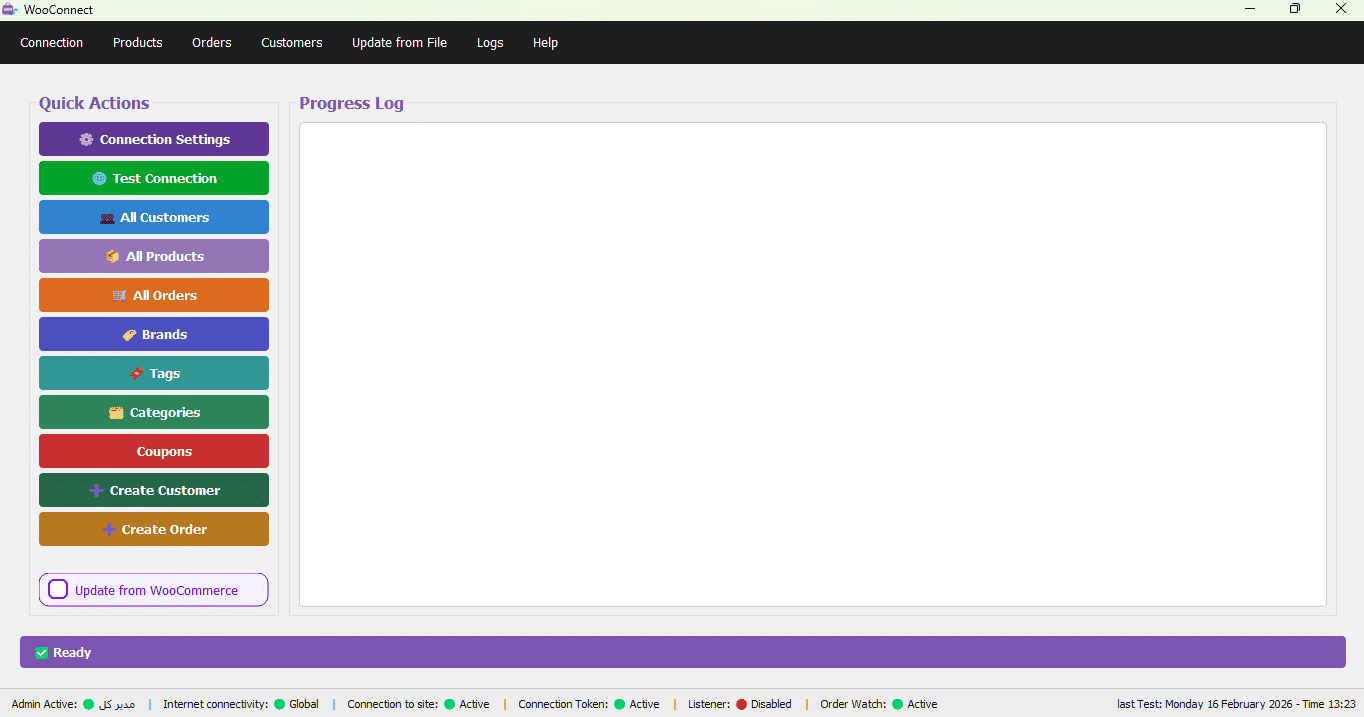
Why Manage WooCommerce from Windows with WooConnect?
- ⚡ Windows Management Interface: Supported management tasks run through the desktop application; communication and synchronization with the store still depend on your internet connection and hosting infrastructure.
- 🔒 Clear Hosting Architecture: Your WooCommerce store and its primary data remain on the web host or internet server while WooConnect connects to that store from Windows.
- 🛠️ Easy Management: With WooConnect software, you can manage your entire store directly from Windows without constantly logging into the WordPress admin panel.
- 📊 Full WooCommerce Management Panel: Access all WooCommerce features including product management, orders, customers, coupons, and discounts.
- 💰 Clear Costs: Web hosting or a server is still required for the store and remains separate from the WooConnect license; WooConnect does not replace hosting.
📌 Key Point: WooConnect is a Windows desktop client for managing and connecting to a hosted WooCommerce store; it is not a local web-hosting platform. Your production store remains on its web host or server.
WordPress Admin vs. WooConnect Management from Windows
| Criteria | Direct WordPress Administration | WooConnect on Windows |
|---|---|---|
| Hosting Required | 🔴 Yes | 🟢 Yes; the production store remains on web hosting or a server |
| Cost | 🔴 Monthly | 🟢 Hosting/server remains required + WooConnect license |
| Speed | 🟡 Hosting-dependent | 🟢 Local desktop interface; store communication still depends on internet and hosting |
| Security | 🟡 Hosting-dependent | 🟢 Depends on site, hosting, access controls, and the Windows system |
| Store Management | 🟡 Via WordPress panel | 🟢 From Windows |
| Accounting Integration | 🔴 Requires separate plugin | 🟢 Integrated (Excel) |
Step-by-Step WooConnect Setup Guide
Step 1: Install WooConnect
First, purchase WooConnect software from the product page. After purchase, download and install the setup file on Windows 10 or 11. For detailed instructions, see the WooConnect installation guide.
Step 2: Activate License
Open the software and enter your license key to activate it.
Step 3: Connect WooConnect to Your WooCommerce Store
Your WordPress/WooCommerce store must already be active on a web host or internet server. Configure the store connection in WooConnect so the Windows application can communicate with that hosted store over the internet. WooConnect does not install or host the production store on Windows.
- ✅ No XAMPP or WAMP is required to host the store through WooConnect — because the production store remains on its web host or server and WooConnect acts as a Windows management client.
- ✅ The store database remains on the server — the WordPress/WooCommerce database is part of the hosted store, and WooConnect does not replace the store database or hosting.
Step 4: Start Managing Your Store
After connecting the store, you can use WooConnect’s supported management features from Windows. From here you can:
- Manage products (add, edit, delete)
- View and manage orders
- Manage customers
- Create coupons and discounts
- And many more WooCommerce features—all with high speed
All of this is done without constantly logging into the WordPress panel, directly from Windows.
Connect to Excel for Automated Management
One of the biggest advantages of using WooConnect is the ability to automatically connect your WooCommerce store to Excel files. With this feature, you can:
- Automated inventory sync: Any changes in your Excel file are instantly applied to your store.
- Bulk product updates: Edit product prices, stock, and descriptions in Excel and sync with one click.
- Centralized management: Manage all store and Excel data in one integrated system.
💡 Key Advantage: Your WooCommerce store remains hosted online while WooConnect software lets you manage supported product workflows from Windows and work with Excel files. An internet connection is required for communication and synchronization with the hosted store. For a complete guide, read How to Connect Excel to WooCommerce.
Conclusion
Managing a hosted WooCommerce store from Windows with WooConnect software lets you use a desktop application without moving the production store off its web host. With this architecture:
- An ultra-fast, full-featured management panel
- Your WooCommerce store and its primary data remain on the web host or internet server
- Hosting costs remain because the production store still requires web hosting or a server
- Seamless Excel integration for automated inventory and price management
📌 Final Verdict: If you want to manage your hosted WooCommerce store from Windows, WooConnect connects the desktop application to that online store; the production WordPress/WooCommerce site remains on your web host or server.
For more information about WooCommerce, visit the official WooCommerce website.
🚀 Start Managing WooCommerce from Windows Today!
Get WooConnect now and manage your store with speed and security.
Install in 5 minutes, auto-sync, 24/7 support.
Published by WooConnect | The Professional Solution for Connecting Excel to WooCommerce
